
Open a business application in EA Workspace on a freshly configured instance and look for the Product Capability related list. On most existing CMDBs it is not there. Try to create an application lifecycle for the same application and the option is not available either. Nothing is broken. The application has no product model behind it, and one scheduled job fixes that for every application at once.
What a product model is, and why a business application needs one
CSDM separates what you designed from what you run. The Design domain holds product models, which describe a thing in the abstract: this is SAP ECC, version whatever, owned by this vendor. The Manage Technical Services and Manage Portfolio domains hold the CIs, which are the instances actually deployed. A laptop model is the product model. The laptop on your desk is the CI. Business applications follow the same pattern. The business application record cmdb_ci_business_app is the thing in your portfolio. Its product model is the abstract description of it, and the two are connected by the Model ID field on the business application.
Older CMDBs never made that connection because nothing needed it. Business applications were loaded years ago, straight into cmdb_ci_business_app, with Model ID left empty. Enterprise Architecture needs it, because two things EA does live on the product model, not on the CI:
Application lifecycles. The lifecycle that says an application is in Implementing, In Production or Retired, with the planned dates, is defined against the application model. No model, no lifecycle.
Product capabilities. Which business capabilities an application provides is recorded against the product model. This is what the Product Capability related list on the business application shows, and a client script named Hide/Show Product Capability Related List hides the list whenever model_id is empty. That is why the related list seems to be missing rather than empty.
So the job is not housekeeping. Without it, a good part of EA’s application portfolio cannot be populated.
What the job does
CSDM Product Model Assignment lives under All > System Definition > Scheduled Jobs and needs admin. The whole job is one line:
new CSDMModelUtil().populateEmptyProductModels();Everything it does is in the CSDMModelUtil script include, Global scope, and it is short enough to read in two minutes. This is the whole of it:
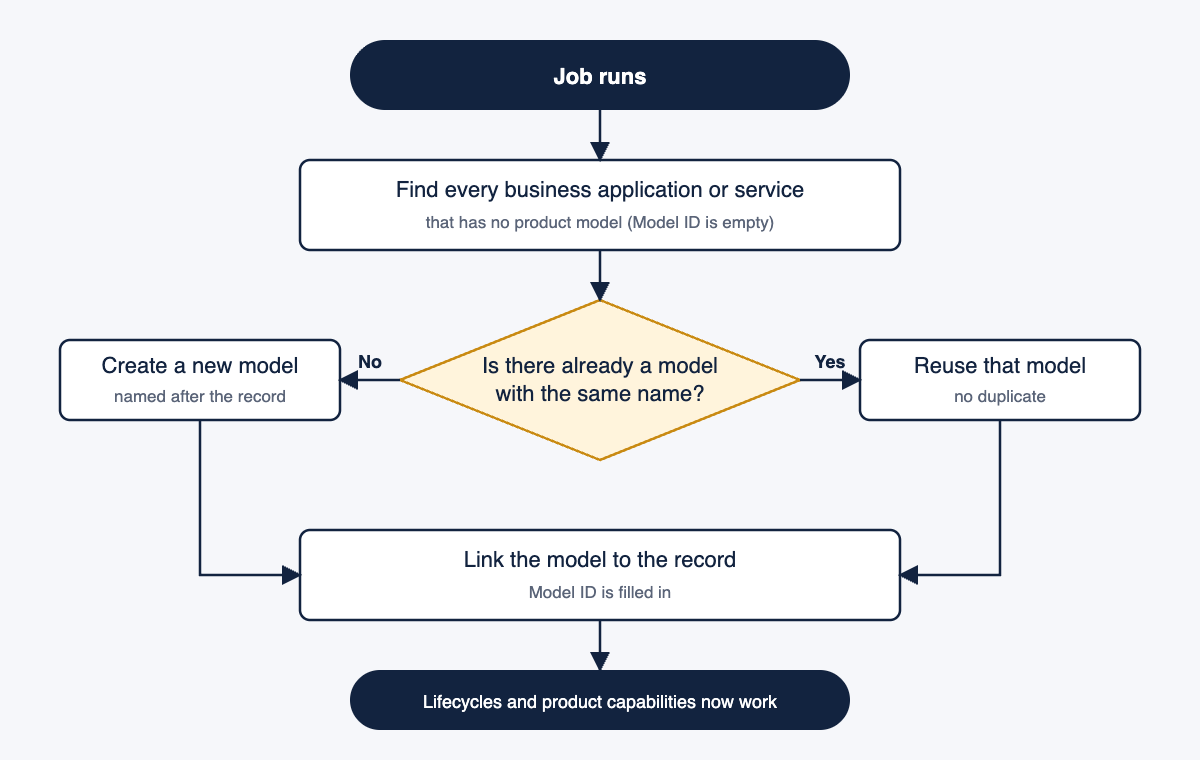
It is worth reading the code as well as the picture, because two things people assume about the job are wrong.
It is not only for business applications. The method works through a fixed list of CSDM classes and no others. A server or a database with an empty Model ID is not this job’s concern.
| Class | Matched on | Model created or found in |
|---|---|---|
Business Service cmdb_ci_service_business | name | cmdb_service_product_model |
Technical Service cmdb_ci_service_technical | name | cmdb_service_product_model |
Service Offering service_offering | name | cmdb_service_product_model |
Application Service cmdb_ci_service_auto | name and version | cmdb_software_product_model, only if SAM com.snc.sams is not active |
Business Application cmdb_ci_business_app | name | cmdb_application_product_model |
Hardware is marked as to do in the code and is not processed. Application services are skipped entirely when SAM Foundation is installed, because SAM needs fields on a software product model that this job does not populate. On an EA instance with TPM, SAM is present, so in practice the job touches the three service classes and business applications.
It finds before it creates. For each record in a class with an empty Model ID, it takes the identifier (the name, plus the version for application services), looks in the model table for a record with exactly that name, and assigns it if found. Only when nothing matches does it insert a new model with that name. If the record has no name at all, it falls back to the class’s default model from cmdb_class_info. Then it updates the CI, which means business rules on the CI table fire as they would for any update.
Two consequences follow directly from that logic. Business applications always get an application product model, never a service or software model, whatever the application is. And the match is an exact name match, nothing cleverer, which is where the naming point below comes from.
Once the job has run, every business application has a model, the Product Capability related list appears, and application lifecycles can be created. Records that already have a Model ID are never selected, so running it again is safe.
When to run it
Once, when you first set EA up on an existing CMDB, straight after the business application load and before you try to create lifecycles or link capabilities. It is job four of the nine ordered jobs in the scheduled jobs article, sitting after the three Performance Analytics collections and before the TPM discovery job, because the TPM run and the scoring job both work better when every application has a model.
Then only after loading a batch of new applications. New applications created through the Register Business Application flow in EA Workspace get a model as part of the process. Applications created through an import set or a script do not, so after any bulk load, run the job again. OOB the job is set to Run: On Demand, so it never fires on its own. I either leave it that way and run it after each load, or change Run to Weekly on instances where applications arrive continuously through integrations.
How to run it
Navigate to All > System Definition > Scheduled Jobs, search for CSDM Product Model Assignment and open it. It is a Global scope job, Active, with Run as set to System Administrator. Leave those as they are and select Execute Now. On a portfolio of a few hundred applications it completes in seconds. On several thousand it still finishes in minutes.
To confirm it worked, open cmdb_ci_business_app.list, add the Model ID column and filter on Model ID is empty. The list should be empty. If anything is left, the job either did not run as a user with write access to the class and the model tables (it uses GlideRecordSecure, so ACLs apply, which is why Run as is System Administrator) or the job was run before those records were loaded.
If the job never runs
| What you see | Why |
|---|---|
| Product Capability related list is not on the Business Application form | A client script hides it while Model ID is empty |
| Cannot create an application lifecycle for a business application | Lifecycles are defined against the application model, and there is none |
| Cannot assign product capabilities to an application | Capabilities attach to the model, not the CI |
Model ID column is empty on cmdb_ci_business_app.list | The job is the only OOB mechanism that fills it for imported records |
| Applications registered through EA Workspace have a model, imported ones do not | The Register flow creates a model, an import does not, and the job has not run since the import |
The last row is the diagnostic. A portfolio where Model ID is populated on some applications and empty on others, split along how the records were created, is a portfolio where this job has not run since the last import.
Three things to know
The model is named after the application, and matched on that name. Because the lookup is an exact name match, SAP, SAP ECC and SAP-ECC-PROD become three application product models where one was wanted. Clean application names before the load, because the product model is what capabilities and lifecycles attach to and three models for one application means three places to maintain them. The same applies across environments: an application loaded once per environment with the environment in its name gets a model per environment.
Existing models are reused, if the names line up. If the Design domain already holds an application product model whose name exactly matches the business application, the job assigns it rather than creating a duplicate. So if the architecture team has already built product models, run the job only after aligning the names on both sides, and you get the link for free.
Nameless records get the class default. A business application with an empty Name field is assigned the default model configured for cmdb_ci_business_app in cmdb_class_info. If that default is empty too, Model ID stays empty and the record silently stays in your exception list. Fix the name, not the job.
Where it fits
Load business applications, run CSDM Product Model Assignment, check for empty Model IDs, then move on to linking capabilities and creating lifecycles. The scheduled jobs article covers the other eight jobs in the ordered set.
This job is step three of the Enterprise Architecture implementation sequence, run straight after the application load.