
Every release note reads the same way. A list of features, each described from the inside. What a CMDB architect needs before an upgrade is different. Which of these change how my instance behaves on Monday, which ones do I have to act on, and in what order. This is that list for the Australia release, worked through the way I would run it on a real upgrade. Each item that deserves its own article gets one, and this page links to them as they go up.
Three things that happen to you whether you act or not
Start here, because these change behaviour on upgrade without anyone enabling anything.
The upgrade takes longer. A composite index is added to the Configuration Item cmdb_ci table, and on a large CMDB the index build extends the upgrade window. This is the second release running with an index change (Yokohama added three to cmdb_rel_ci), so if your last upgrade ran long, expect it again and plan the window accordingly. I explain what the index is and how to size the window in What a CMDB Composite Index Is and Why It Slows the Australia Upgrade. ServiceNow has a knowledge article on reducing the impact, KB2588894, Increased Australia Upgrade Time due to cmdb_ci composite index addition. Read it before you book the outage, not after. Both knowledge articles linked in this article sit on Now Support, so you need a Now Support account with access to your company’s instance to open them. If the link takes you to a login page and no further, ask your ServiceNow administrator or account team to share the article.
Roles change. CMDB tables that needed admin or itil_admin now also accept sn_cmdb_admin. Tables that needed itil now also accept sn_cmdb_editor. That is the good news, because CMDB administrators no longer need platform admin. The catch is for anyone skipping a release. If you upgrade to Australia directly from Xanadu or Yokohama, you must run the scheduled job named Remove CMDB Roles from ITIL roles and Add CUD access to sn_cmdb_admin/sn_cmdb_editor roles or the CMDB Admin and CMDB Editor roles are not configured correctly. Coming from Zurich this was already done.
Read only fields get stricter. A new platform wide read_only_option field on dictionary entries adds levels of read only protection, including strict_read_only and client_script_modifiable. The change is described as backward compatible, and in my experience “backward compatible” and “client scripts that set read only fields” do not always agree. Use KB2718122 to identify affected fields on your instance and test any client script or UI policy that writes to a field a user cannot edit.
Two things that were removed or are going
The Multisource Report Builder is gone. If anyone built reports on it, they need rebuilding in CMDB 360, which is available in both CMDB Workspace and Service Graph Workspace. Find out who used it before the upgrade, not from the ticket afterwards.
The Service Graph Connector for OpenTelemetry is planned for deprecation in a future release with no replacement. If it is in use, start the conversation about where that data goes now.
Six things you can choose to switch on
These are the features, and this is the order I would evaluate them in.
1. Dynamic IRE. A new identification engine for the Hardware class and everything under it. No identification rules to write, scoring across many attributes in parallel, and a simulation mode that runs it alongside your existing rules and reports a parity score before you commit. It is on by default for new instances from Zurich Patch 11 and opt in for upgraded ones. This is the biggest architectural decision in the release and the one to give real time to.
2. Deduplication for lookup and related tables. IRE can now raise deduplication tasks for duplicates it finds in lookup tables like Serial Number and related tables like Software Instance, controlled by a new allow list table and a new property. Off by default. Also new, the ability to switch off related table workflows during a merge so that a Change record’s business rules cannot block the remediation.
3. The Deduplication Task Resolution Assistant. A ServiceNow Otto for CMDB skill, version 3.0 required, that preselects the main CI and the remediation options on a deduplication task and shows its reasoning. The admin still approves. If you have a backlog of deduplication tasks, this is where the payback is.
4. Service Graph Workspace. Included in CMDB Workspace 9.0 from the Store, a new home for CMDB administrators, data owners and analysts that puts company, location, user and CMDB data together and lets people search by business context instead of by class hierarchy. The contexts come from a new plugin, Service Graph Workspace – Content. Before adopting it, list every customisation you made to the old CMDB Workspace and decide which ones the new workspace makes unnecessary.
5. CMDB Success Advisor. A Store app with dashboards for principal CI classes, hardware assets and software installs, each with recommendations and remediation actions, reached from Service Graph Workspace. It is built around Data Foundations, HAM and SAM outcomes. Treat it as the engine for a continuous data quality programme rather than a one off report.
6. Lookup identifiers on manual CI creation. CMDB Workspace 8.0 lets a person creating a CI by hand pick a lookup identifier entry and fill the mandatory attributes for it, so a manually created CI goes through IRE properly instead of becoming next month’s duplicate. Review your manual CI creation process and move users onto it.
Two smaller ones worth knowing
Domain separation now covers five more tables. cmdb_key_value, cmdb_print_queue_instance, cmdb_software_instance, samp_client_access and samp_oracle_options. Only relevant on domain separated instances, and there it matters.
CMDB Query Builder V2 mode supports more query structures and runs faster. Still unsupported. Related list conditions, NOT combined with filters, some Service Mapping relationships, and OR unless you enable glide.cmdb.query.or_execution_mode. If a saved query does not run in V2, this list is why.
The order I would run it
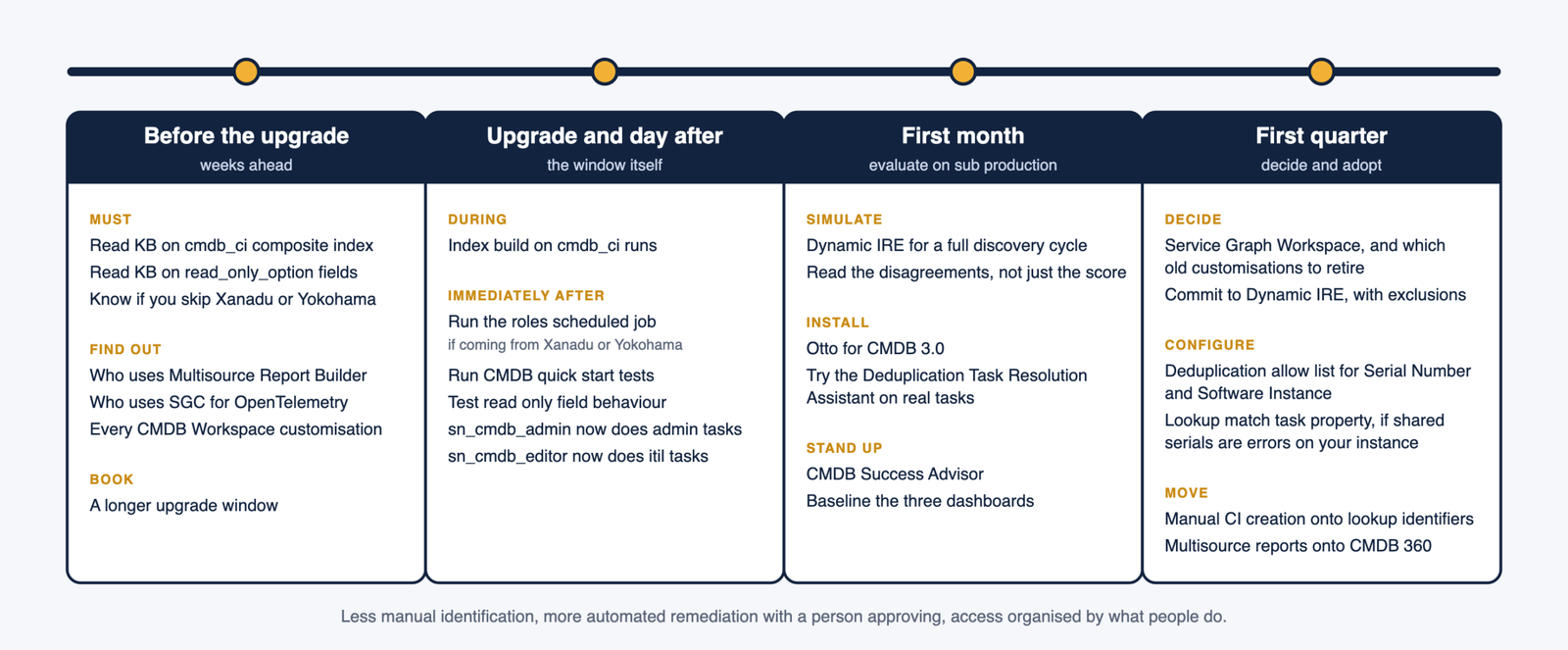
Before the upgrade. Read the two knowledge articles, KB2588894 and KB2718122, find Multisource Report Builder users, list CMDB Workspace customisations, and confirm whether you are coming from Zurich or skipping releases.
During the upgrade window. Allow for the index build.
Immediately after. Run the roles scheduled job if you skipped a release, run the CMDB quick start tests (new in this release, and copy them if you customised CMDB), and test read only field behaviour.
In the first month. Simulate Dynamic IRE on sub production, install Otto for CMDB 3.0 and try the resolution assistant on real deduplication tasks, and stand up Success Advisor.
In the first quarter. Decide on Service Graph Workspace, configure lookup and related table deduplication for the tables that matter to you, and move manual CI creation onto lookup identifiers.
The direction of the release is clear once you lay it out this way. Less manual identification configuration, more automated remediation with a human approving, and access organised around what people do rather than what class a CI belongs to. The upgrade is the excuse to simplify what you built for the old model.