
Enterprise Architecture in ServiceNow is four portfolios that pretend to be independent. Business capabilities, applications, information objects and technology each have their own setup pages, their own roles and their own jobs, and the product documentation treats them as four separate manuals. On an implementation they are not separate at all. The application portfolio has nothing to hang from until capabilities exist. Technology has nothing to scan until applications are linked to services. Scoring reads all of it. Do them in the wrong order and you spend the second half of the project rerunning jobs you already ran.
This is the order I use. Eight steps, each one producing something the next step reads.
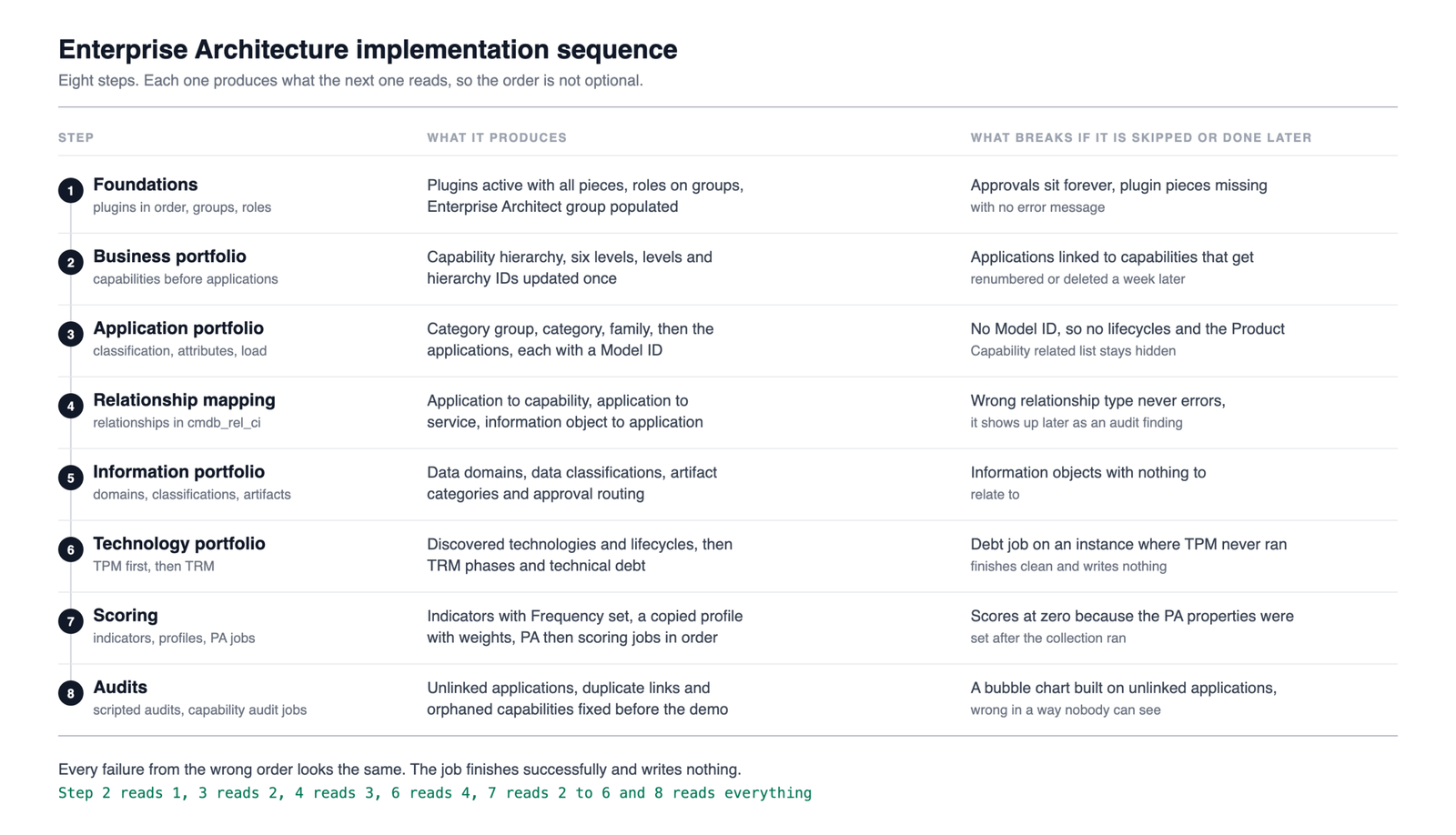
The sequence at a glance
| # | Step | What it produces | Why it sits here |
|---|---|---|---|
| 1 | Foundations | Plugins active in order, groups, roles, Enterprise Architect group populated | Everything else fails silently without it |
| 2 | Business portfolio | Capability attributes, form, hierarchy | Capabilities are the frame applications hang from |
| 3 | Application portfolio | Classification, attribute values, form, data load | Needs capabilities to link to |
| 4 | Relationship mapping | Applications to capabilities, information objects to applications | Relationships are what every audit and score reads |
| 5 | Information portfolio | Data domains, classifications, artifact categories, approval routing | Needs applications to relate to |
| 6 | Technology portfolio | TPM discovery, then TRM categories, phases and the debt job | Needs applications linked to services |
| 7 | Scoring | Indicators, profiles, weights, then the PA and scoring jobs | Depends on everything above being populated |
| 8 | Audits | Scripted audits and capability audit jobs | Fix the gaps before anyone sees a bubble chart |
1. Foundations, once
Activate the core Enterprise Architecture plugin com.snc.apm first, then EA Workspace sn_apm_ws from the Store, then feature plugins (TRM, TPM, Business Stakeholder, Predictive Intelligence) and only then the optional add ons. Order matters because a plugin activated before its prerequisite installs with pieces missing and no error message. The fix is always the same. Activate the prerequisite, then reactivate the dependent plugin.
Then groups and roles. The Enterprise Architecture group already exists on the instance. Create groups for the architects, the IT application owners and the business owners, assign sn_apm.apm_admin, sn_apm.apm_analyst or sn_apm.apm_user to the group rather than to individuals, and never strip roles out of the baseline roles. If a baseline role carries something you do not want, make your own group with narrower roles instead.
One more thing at this stage, and it is the one most implementations miss. Populate the Enterprise Architect group under All > Enterprise Architecture > Administration > Services Approval Group. Roles do not grant approval authority in EA. Membership of that group does. An analyst who is not in it cannot approve a TRM request, an artifact version or an application retirement, and the request just sits there.
2. Business portfolio first
This surprises people. The instinct is to load applications because that is the data the customer has ready. Resist it. Business capabilities are the structure applications are placed on, and the capability map is what the executives look at. Load applications first and you end up linking them to capabilities that get renumbered, relevelled or deleted a week later.
Configure Business Unit and Department values, keep the rest of the attribute values as delivered, configure the Business Capability form in the EA Workspace view through Form Builder, then load the hierarchy. The hierarchy has hard rules. Six levels maximum (0 to 5), you can only delete leaf capabilities, and no circular parents. If the customer’s reference model brings its own capability numbering, set use_business_capability_custom_hierarchy_id to true before the load, and accept that the platform will no longer check for duplicate IDs.
After the load, run Update Business Capability Levels and Hierarchy IDs once.
3. Application portfolio
Classification goes in a fixed order because each level references the one above it. Application category group, then application category, then application family. Category is mandatory and should stay high level (Sales, HR, Finance) because applications in the same category are the ones you compare during rationalization. Family is the vendor’s suite grouping, Oracle EBS Financials for example.
Then the attribute values in the customer’s own vocabulary. Application type, architecture type, install type, planned disposition and its migration strategies, business criticality, data classification. Leave Status, Life cycle stage and Stage status alone. They belong to CSDM, they are driven by the life_cycle_mapping table, and any change goes through the CSDM team.
Configure the form, then load. On an existing CMDB run CSDM Product Model Assignment straight after the load so every application gets a Model ID. I wrote up that job in CSDM Product Model Assignment, the job that gives every business application a model. Without it, application lifecycles and product capabilities cannot be created and the Product Capability related list stays hidden.
4. Relationship mapping
Applications to capabilities, then information objects to applications. Both are ordinary CI relationships in cmdb_rel_ci, which is why a wrongly typed relationship does not error when you create it. It shows up later as an audit finding. Applications also need a Consumes::Consumed by relationship to their application services, because that is the path TPM walks in step 6. If service relationships are weak, fix them now rather than after the technology job has run against them.
5. Information portfolio
The lightest of the four. Data domains from the Portfolio list view, data classifications in cmdb_data_classification, the Information Object form in the Information Object APM view, artifact categories (the seven TOGAF phases ship out of the box), and the approval routing for artifact versions in Workflow Studio. Information objects relate to applications through Uses::Used by.
6. Technology portfolio
TPM before TRM, always. TPM discovers what actually runs under each application by walking Business Application to Application Service to svc_ci_assoc to computer to software install to normalized discovery model. Set sn_apm_tpm.softwareDiscoveryModelProductFilterForTPM before the first run or you import every font on every server. Then run Populate TPM Discovered Technologies and Lifecycles, then Populate Technology Lifecycle Risks.
Only then TRM. Categories, phases (Approved, Approved with Constraints, Evaluation, Divest, Unapproved, or the customer’s own ladder), the sn_apm.endRangeOfTPMLifecycle property for the last phase’s end date, and finally Populate TRM technical debts in the EA Workspace. Technical debt is computed from TPM discovered technology. Run the debt job on an instance where TPM has never run and you get an empty view with no error.
TRM and the debt job need SAM Foundation or SAM Professional. Without SAM there is no software product data to compare against.
7. Scoring last
Scoring is the thing the customer wants to see first and the thing that has to be configured last, because every indicator reads data produced by steps 2 to 6. Copy the default scoring profile rather than editing it, attach the indicators the customer actually uses, set weights, and set Frequency on every indicator or the scoring job has nothing to calculate against.
Set the three incident and change properties to true before touching the PA jobs, then run them in order. [PA Incident] Daily Data Collection, [PA Change] Daily Data Collection, [PA Problem] Daily Data Collection, then Load Application Indicators and compute Application Scores. Scores appear on the last day of each indicator’s fiscal period, not the day you run the job, which is worth telling the customer before they ask why the chart is still blank. The arithmetic behind the number is in how ServiceNow Enterprise Architecture actually calculates an application score.
8. Audits before the demo
Run the scripted audits under Enterprise Architecture > Administration and the three capability audit jobs. Applications not related to any capability, applications related to multiple capabilities in the same hierarchy, and orphaned capabilities. Fix what they surface. A bubble chart built on unlinked applications is not wrong in a way anyone can see, which is exactly the problem.
What happens when the order slips
Every failure I have seen from getting this wrong looks the same. A job finishes successfully and writes nothing. Scores at zero because the PA properties were set after the collection ran. Technology views empty because applications were loaded before their services existed. Capabilities relevelled after applications were mapped to them. None of it errors. All of it costs a rerun.
The scheduled jobs and the order to run them and the system properties each have their own article. This one is the order to do it all in.