
The Australia release notes carry one sentence that most people skim past. Due to changes in the Configuration Item table, if you are upgrading to Australia you might experience an increased upgrade time. Behind that sentence is a composite index being added to cmdb_ci, and behind that is the reason a CMDB upgrade window can run hours past its estimate. This is what is happening, why it happens on this table in particular, and what to do about it before you book the outage.
Every CI is a row in cmdb_ci
The CMDB uses table extension. Linux Server extends Server, Server extends Computer, Computer extends Hardware, Hardware extends Configuration Item. On the database, each of those classes has its own table holding only the columns that class adds, and every CI also has a row in the base table cmdb_ci holding the columns every CI shares, such as name, class, operational status and the sys fields.
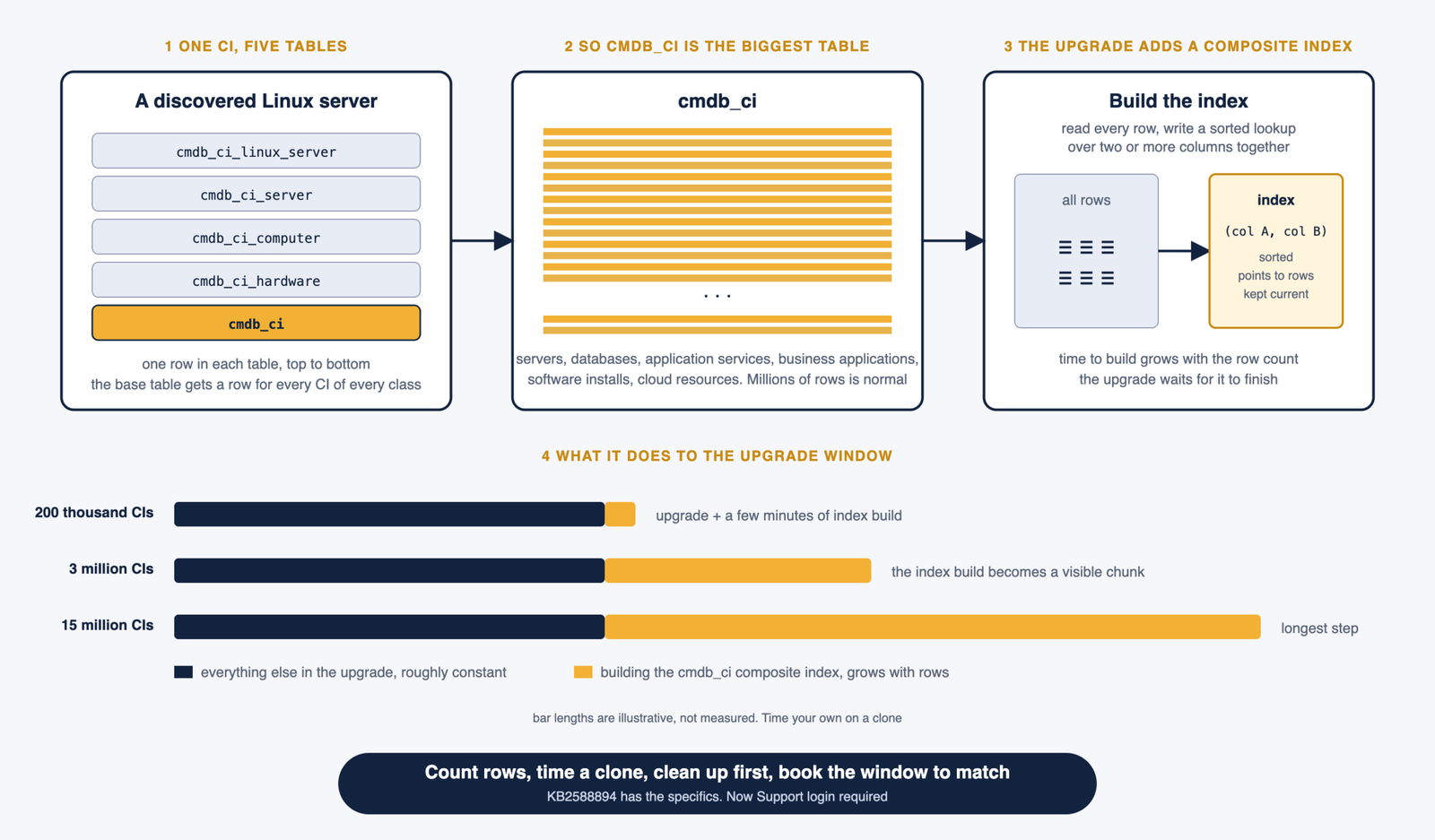
That has a consequence people forget. A discovered Linux server is one CI to you but it is a row in cmdb_ci_linux_server, a row in cmdb_ci_server, a row in cmdb_ci_computer, a row in cmdb_ci_hardware and a row in cmdb_ci. The base table has a row for every CI on the instance regardless of class. On a mature instance with discovery, cloud connectors, software installs modelled as CIs and years of history, cmdb_ci is very often the largest table there is. Millions of rows is normal. Tens of millions is not unusual.
What an index is, and what makes one composite
A database index is a separate structure that lets the database find rows by a column value without reading the whole table. Without an index on name, a query for a CI called prodweb01 reads every row and checks each one. With an index, it goes almost straight to the match. An index is built once and then kept up to date on every insert and update.
A composite index is the same idea over two or more columns together, in a fixed order. Queries that filter on those columns in combination get the benefit. This is why one is being added to cmdb_ci. Platform features that query the base table on a combination of columns, and IRE is the obvious candidate given its Yokohama history, get faster once the index exists.
Why building one takes so long on cmdb_ci
Building an index means reading every row in the table and writing the index structure. The time grows with the number of rows. On a small table it is instant. On a table with twenty million rows it is a long running operation, and depending on the database engine and how the operation is performed, the table can be locked or heavily loaded while it runs.
During an upgrade that index build is one of the schema changes the upgrade applies, and the upgrade waits for it. Nothing else is slow. The plugin updates, the fix scripts and the record updates take their usual time. The index build is the single step that scales with the size of your CMDB, and on a big CMDB it becomes the longest step in the whole window.
This is the second release running with this pattern. Yokohama added three indexes to the CI Relationship table cmdb_rel_ci, on parent and type, child and type, and child, parent, type and port, to speed up IRE queries against that table, and the release notes for that release carried the same warning about upgrade time. If your Yokohama upgrade ran longer than planned and nobody worked out why, this was probably why. Australia does the same thing to cmdb_ci, which is bigger.
What the picture looks like
What to do before the upgrade
The knowledge article ServiceNow points to, KB2588894, has the specifics for this index and the recommended mitigation. It is on Now Support, so you need an account with access to your company’s instance, and if you cannot open it ask your administrator or account team. What follows is the general approach I take to any index addition on a large table, which is what the KB will be steering you towards.
Know your row count. Open cmdb_ci.list and look at the record count, or run a quick count in a background script. That number is the single biggest input to how long the build takes. An instance with two hundred thousand CIs has nothing to worry about. An instance with fifteen million does.
Test the upgrade on a clone. The only reliable estimate is to upgrade a recent clone of production on sub production and time it. The index build on the clone takes roughly as long as it will on production, because the row count is the same. Do this for every upgrade, but especially this one.
Clean up before you upgrade rather than after. Every row you remove from cmdb_ci is a row the index build does not have to read. Retired CIs that should have been archived, stale discovered CIs nobody has cleaned up, duplicate CIs waiting in the remediation backlog, software installs modelled as CIs that should have been SAM records. A CMDB that has never been tidied can lose a meaningful share of its rows to a proper retirement and archival pass, and the upgrade gets faster as a side effect of doing something you should have done anyway.
Talk to ServiceNow about the option of adding the index ahead of the upgrade. For previous index additions, the guidance for very large tables has included having the index created before the upgrade window through a support case, so that the upgrade itself has nothing to build. Whether that applies to your instance and this index is exactly the question the KB answers and the support team confirms.
Book the window to match. Once you have a timing from the clone, plan the production window with that number in it and tell the business the reason. An upgrade that runs long with no explanation is a problem. An upgrade that runs the length you told everyone it would is a Tuesday.
What this is not
It is not a defect and it is not something you can switch off. The index is there because queries against the base table needed it, and after the upgrade you get the benefit on every IRE run and every CMDB query that touches the indexed columns. It is also not unique to the CMDB. Any release that adds an index to a large table has this effect. The CMDB just happens to own the largest tables on most instances, so it is where the effect is felt.
The Australia upgrade checklist puts this alongside the other things that change on upgrade day.