
Every so often Discovery does exactly what it is told and still leaves the CMDB wrong. This was one of those.
We ran Solaris discovery. The server CIs showed up. The Solaris virtual machine instance CIs showed up. Both classes, populated, attributes looking fine. And not a single relationship between them. Every guest sat in the CMDB as a standalone box with no host, which means no virtualization topology, no impact analysis through the host, and a Service Mapping view that pretended those VMs were floating in space.
If you only run Linux and Windows you will probably never hit this. If you have Solaris in the estate, read on, because the out-of-the-box logic quietly does nothing for it.
A quick refresher on how Solaris shows up in the CMDB
Solaris shops mostly virtualize with LDOMs (Logical Domains). The control domain, sometimes called the primary domain, is the physical host with direct access to the hardware. Guest LDOMs are the virtual machines running on top of it.
ServiceNow models this with two classes:
cmdb_ci_solaris_serverfor the host, the physical or logical Solaris server.cmdb_ci_solaris_instancefor the guest, the Solaris virtual machine instance.
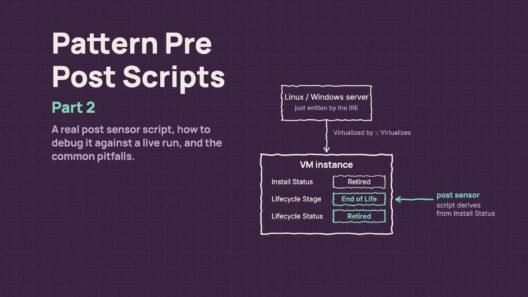
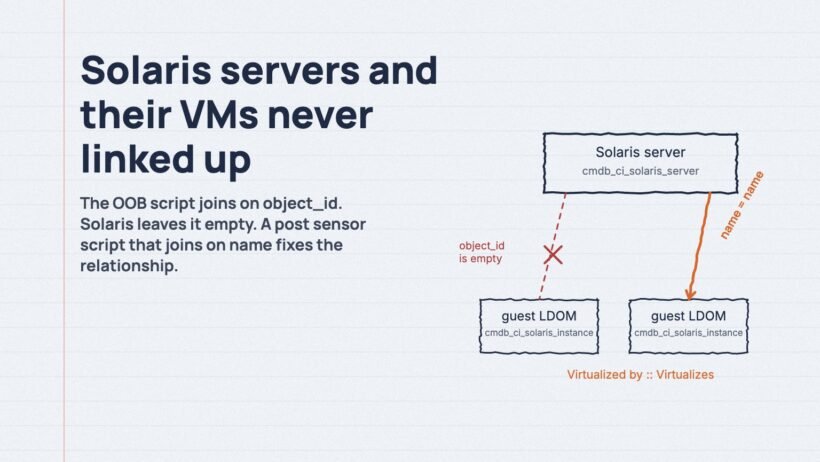
For the model to mean anything, each instance has to hang off its server through a Virtualized by::Virtualizes relationship. Without that link the guest is just an orphan record.
What was actually going wrong
ServiceNow ships a post sensor relationship script for Linux and Windows. It takes the discovered server, finds the matching VM instance, and creates the relationship. The match is done on the object_id field. That works because on Linux and Windows both the server CI and the VM instance CI carry an object_id.
On Solaris they don’t. object_id is empty on cmdb_ci_solaris_server and empty on cmdb_ci_solaris_instance. So the relationship step goes looking for a pair with a common object_id, finds nothing, and moves on. No error, no warning, no relationship. It took longer than I’d like to admit to notice, precisely because nothing failed.
What the two CIs do share is the name value. A Solaris server and its instance both carry the same host name. That is the key the fix uses.
The fix: a Solaris version of the post sensor script
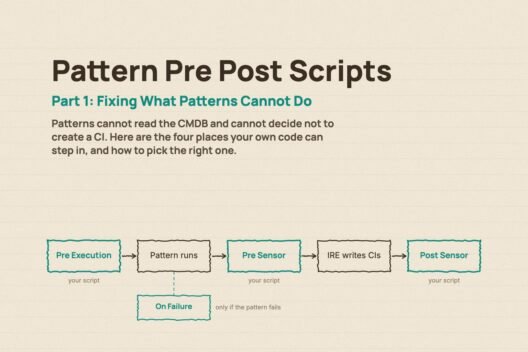
I took the OOB Linux/Windows server-to-VM relationship script and adapted it for Solaris, then attached it as a post sensor script so it runs after the Identification and Reconciliation Engine (IRE) has processed each payload. Four changes:
- The class check now looks for
cmdb_ci_solaris_server. - The VM table is
cmdb_ci_solaris_instance. - The join key is
nameinstead ofobject_id. - The relationship type is still Virtualized by::Virtualizes, the insert is idempotent, and terminated instances are skipped unless they are the only match.
The flow per payload: find the Solaris server CI in the IRE output, read its name, look up cmdb_ci_solaris_instance for the same name, and insert a cmdb_rel_ci record only if that exact parent, child and type combination isn’t already there.
Here is the script.
var rtrn = {};
var solarisServerGlideRecord;

var getDiscoveredSolarisServerGlideRecord = function() {
    var traversedObject;
    for (var itemIndex in payloadObj.items) {
        traversedObject = payloadObj.items[itemIndex];
        if (traversedObject.className == 'cmdb_ci_solaris_server') {
            solarisServerGlideRecord = getGlideRecordByAttribute(
                traversedObject.className, 'sys_id', traversedObject.sysId);
            solarisServerGlideRecord.next();
            break;
        }
    }
};

var createRelationBetweenSolarisServerAndVMInstance = function() {
    if (!solarisServerGlideRecord) {
        gs.warn('CMDB Post Sensor: No Solaris server CI found in payload. Skipping.');
        return;
    }
    var serverName = solarisServerGlideRecord.getValue('name');
    if (!serverName) {
        gs.warn('CMDB Post Sensor: Solaris server CI has no name value. Skipping.');
        return;
    }
    findAndCreateRelationToVM(serverName, solarisServerGlideRecord.getUniqueValue());
};

var findAndCreateRelationToVM = function(serverName, ciSysId) {
    var vmGlideRecord = new GlideRecord('cmdb_ci_solaris_instance');
    vmGlideRecord.addQuery('name', serverName);
    vmGlideRecord.query();
    while (vmGlideRecord.next()) {
        if (!vmGlideRecord.hasNext() || vmGlideRecord.state != 'off') {
            createRelation(ciSysId, vmGlideRecord.getUniqueValue(),
                'd93304fb0a0a0b78006081a72ef08444');
            break;
        }
    }
    return vmGlideRecord;
};

var createRelation = function(parentSysId, childSysId, relationSysId) {
    var relationGlideRecord = new GlideRecord('cmdb_rel_ci');
    relationGlideRecord.addQuery('child', childSysId);
    relationGlideRecord.addQuery('parent', parentSysId);
    relationGlideRecord.addQuery('type', relationSysId);
    relationGlideRecord.query();
    if (!relationGlideRecord.next()) {
        relationGlideRecord.setValue('child', childSysId);
        relationGlideRecord.setValue('parent', parentSysId);
        relationGlideRecord.setValue('type', relationSysId);
        relationGlideRecord.insert();
        gs.info('CMDB Post Sensor: Created Solaris server -> instance relation.');
    } else {
        gs.debug('CMDB Post Sensor: Relation already exists. Skipping insert.');
    }
};

var getGlideRecordByAttribute = function(table, attributeName, attributeValue) {
    var glideRecord = new GlideRecord(table);
    glideRecord.addQuery(attributeName, attributeValue);
    glideRecord.query();
    return glideRecord;
};

if (payloadRecords) {
    while (payloadRecords.next()) {
        var payloadObj = JSON.parse(payloadRecords.ie_output + '');
        solarisServerGlideRecord = null;
        getDiscoveredSolarisServerGlideRecord();
        createRelationBetweenSolarisServerAndVMInstance();
        payloadObj = null;
    }
}

rtrn = {
    'status': {
        'message': 'Create Relation Between Solaris Server and Solaris Instance Post Sensor Finished Successfully',
        'isSuccess': true
    },
    'patternId': patternId
};
Deploying it
This runs through ServiceNow’s Pattern Pre Post Processing Script feature. Create a new record there, set the type to Post Sensor, point it at your Solaris discovery pattern, and paste the script in. Post sensor is the right slot because it runs after the Identification Engine has written the CIs, which is exactly when both the server and the instance exist to be linked. The payloadRecords and patternId variables the script uses are the ones that feature hands you.
Before you do, open cmdb_rel_type on your own instance and check the sys_id for Virtualized by::Virtualizes. The one in the script is the one I had. It is usually the same across instances, but “usually” is not a word I want in a relationship script, so verify it and swap it if yours differs.
Because the insert checks for an existing parent, child and type before writing, you can leave this running across every discovery cycle without breeding duplicate relationships.
How I checked it worked
Re-ran Solaris discovery. Opened a Solaris server CI and looked at the relationship view. Each server now showed Virtualized by::Virtualizes to its instance. Then I filtered cmdb_rel_ci directly to be sure, and ran discovery a second time to confirm the count didn’t move. It didn’t.
What I’d take from this
Out-of-the-box relationship logic assumes object_id is there. When a platform leaves it blank, and Solaris does, the script doesn’t complain, it just skips. Pick a key that both sides really share, and for Solaris that is name.
Never trust a relationship type sys_id you didn’t look up on the instance in front of you.
And guard the obvious edges: no name, terminated instances, repeat runs. The script is small. The cost of getting one of those wrong in a CMDB with a few thousand Solaris guests is not.
If you have hit a variant of this on another platform, I’d like to hear about it. Find me on LinkedIn.