
Turning on a Now Assist skill takes an afternoon. Deciding what happens when a user types something the model should not act on, or when the model produces something a user should not see, takes longer, and it is the part that security and HR will ask about first. AI Guardian is the ServiceNow answer to that. It used to be called Now Assist Guardian and in the Australia release carries the new name. This is what it does, where each part applies, and the one decision you have to make deliberately rather than by default.
What it is
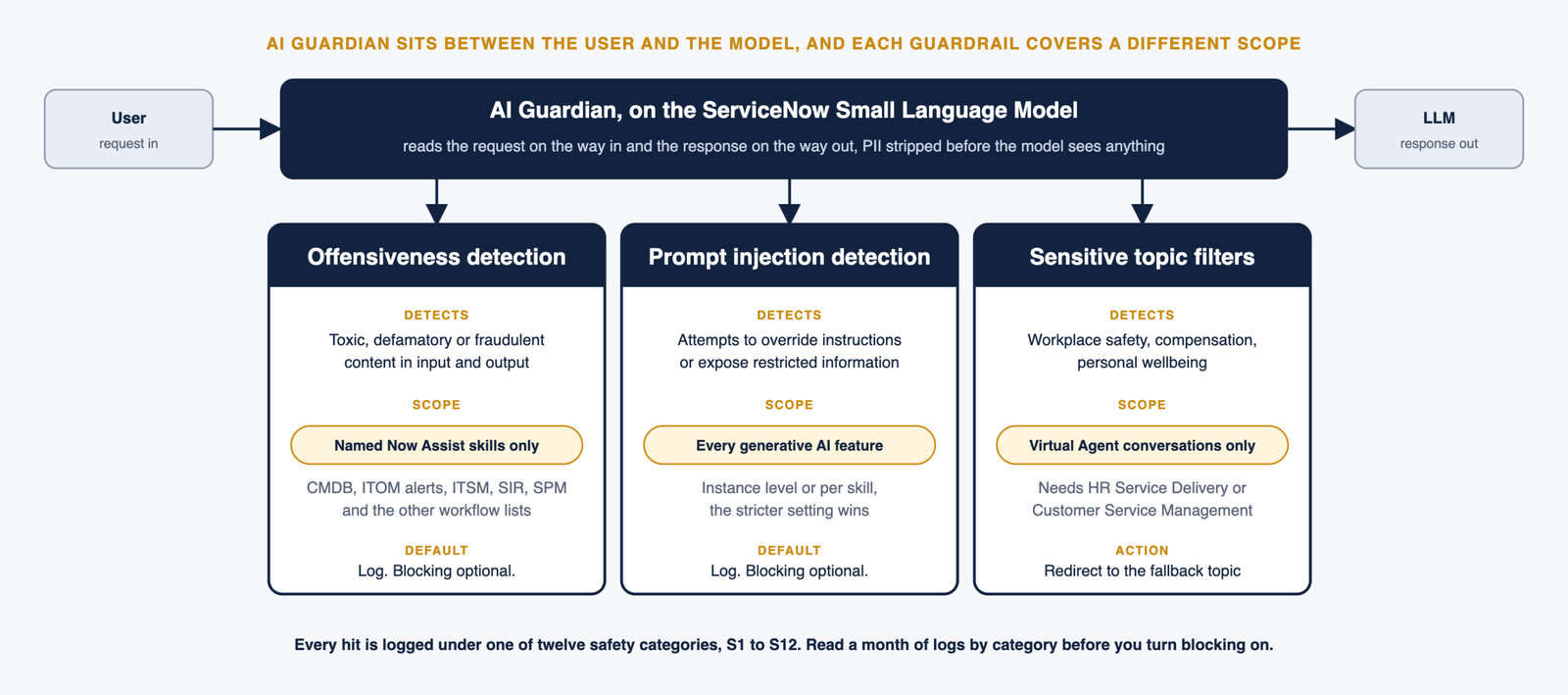
AI Guardian runs on the ServiceNow Small Language Model and sits between the user and whichever large language model answers a Now Assist skill. It reads the request on the way in and the response on the way out, in real time, and decides whether either one crosses a line. It exists because LLM output is probabilistic. The same prompt can produce two different answers, and a request that contains something offensive tends to produce a response that does too.
The three guardrails, and the part people miss
There are three guardrails and they do not all cover the same ground. That is the detail the documentation makes clear and the detail most implementation decks flatten into one tick box.
Offensiveness detection looks for toxic, defamatory or fraudulent content in the input and the output. It applies only to a named list of Now Assist skills. On the Technology side that list is the Otto for CMDB skills (CI summarization, manage duplicate CIs, Service Graph Connector diagnosis), the ITOM alert analysis and alert investigation skills, the ITSM skills such as incident and change summarization, resolution notes, KB generation and chat recommendations, the Security Incident Response skills and the Strategic Portfolio Management skills. Customer, Employee, Creator and Finance workflows have their own lists. A skill not on the list gets no offensiveness check. The full supported skills table by workflow is in the AI Guardian documentation, and it is worth checking your own skills against it during the go live review, because a skill that is not listed has prompt injection as its only protection.
Prompt injection detection looks for attempts to override the instructions the skill was given, expose restricted information or push the model into unintended behaviour. The detector is itself a model trained on the usual techniques, role play, paraphrasing, repetition, instructions to ignore earlier instructions and persuasion. This one applies to every generative AI application and feature on the instance. You can set it at instance level or per skill, and where both exist the more protective setting wins. ServiceNow says plainly that it will not catch every attempt, because the attacks evolve.
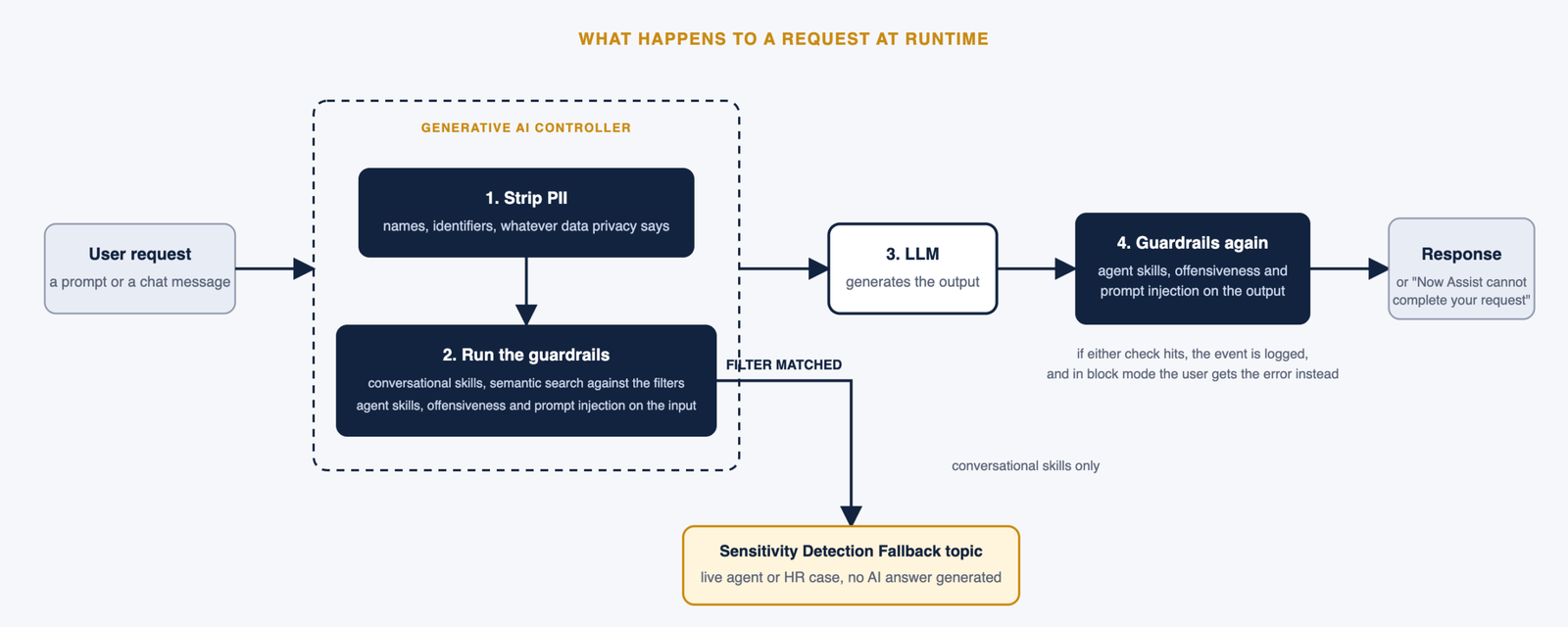
Sensitive topic filters catch subjects a generative model should not be answering, workplace safety, employee compensation, personal wellbeing. These apply to Virtual Agent conversational skills only and need HR Service Delivery or Customer Service Management. When a filter fires the user is sent to the Sensitivity Detection Fallback topic, which can hand off to a live agent or open an HR case. The user can select Proceed, not sensitive, and return to the original topic. Once the fallback flow starts, detection stops for the rest of that conversation.
Log or block, the decision
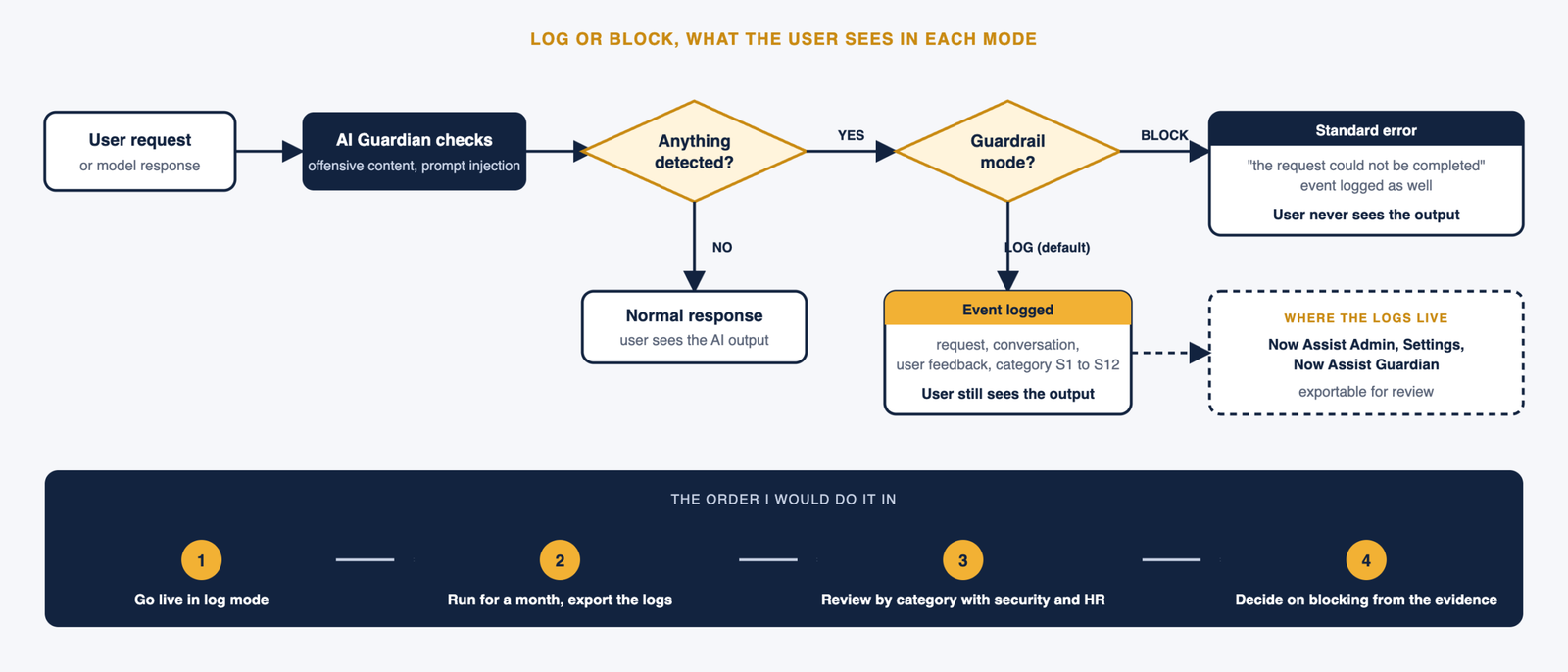
Out of the box, offensiveness and prompt injection events are logged and nothing is blocked. The logs sit under Now Assist Admin, Settings, Now Assist Guardian, and each entry records the request, the conversation it belonged to and any feedback the user gave. They can be exported.
You can switch either guardrail to block. When you do, a detected request returns a standard error saying it could not be completed, and the user never sees what the model produced. The documentation’s own advice is to run in log only for a period and read what comes through before enabling blocking, and I would add a reason to that. A false positive in log mode costs nothing. A false positive in block mode is a user whose incident summary silently failed, who does not know why, and who will tell colleagues the feature does not work. Read a month of logs first, understand what triggers in your environment, then block.
What the logs classify
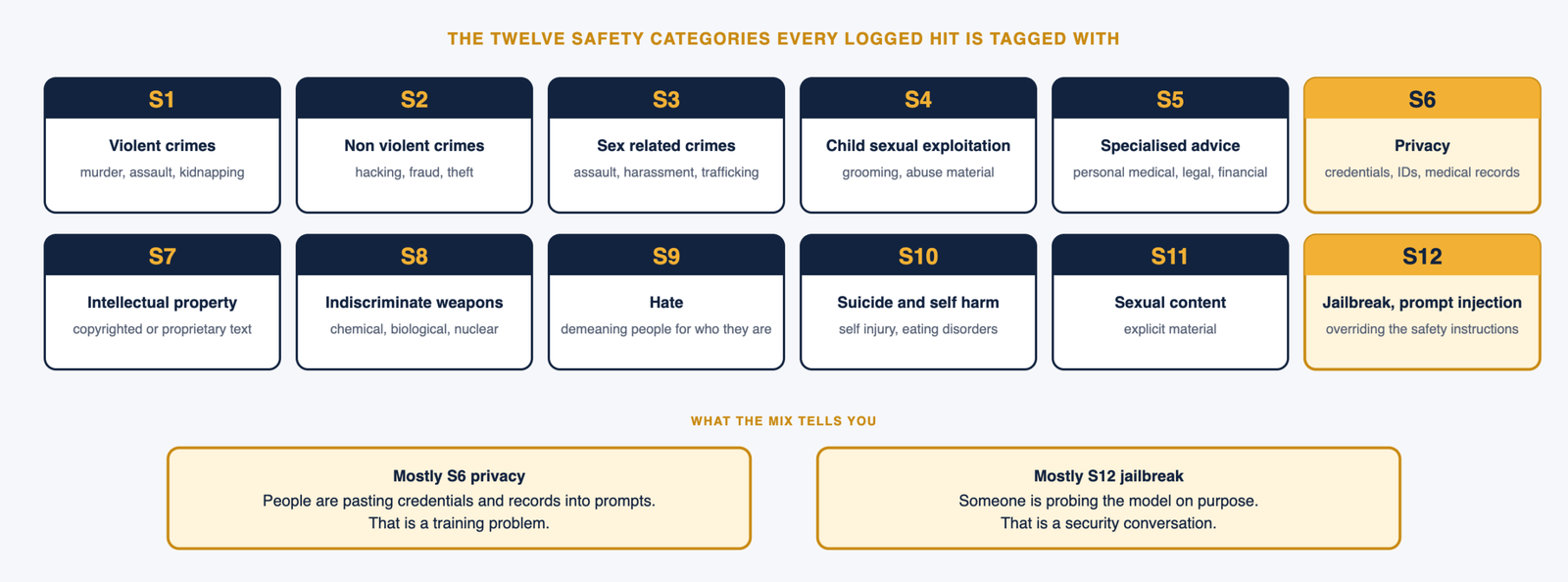
Every hit is tagged with one of twelve safety categories, S1 to S12. Violent crimes, non violent crimes, sex related crimes, child sexual exploitation, specialised advice (personal medical, legal or financial advice), privacy (credentials, government identifiers, financial details, medical records), intellectual property, indiscriminate weapons, hate, suicide and self harm, sexual content, and jailbreak prompts. The category is what makes the log useful for the review above. If most of your hits are S6 privacy, people are pasting things into prompts that they should not, and that is a training problem. If they are S12, someone is probing the model, and that is a security conversation.
What happens at runtime
Two things worth knowing for design discussions. First, every skill that uses AI Guardian strips personally identifiable information before the request reaches the LLM, and what counts as PII is configurable under the Now Assist data privacy settings. Second, the guardrails run at different points. For conversational skills, semantic search checks the request against the sensitive topic filters before anything is generated. For agent skills such as summarization, resolution notes and catalog item generation, offensiveness and prompt injection run on both the input and the output.
New in Australia, your own guardrail provider
The Australia release adds the ability to configure a guardrail service provider, meaning a third party or custom service that runs alongside the default guardrails. If your organisation already has an AI governance policy enforced by its own tooling, this is how it gets applied to Now Assist rather than duplicated inside it.
The checklist I use
Before a Now Assist skill goes live, confirm which of the three guardrails actually cover it, because for most skills the answer is prompt injection only. Confirm prompt injection is on at instance level so nothing slips through a skill that was never configured. Leave both guardrails in log mode for the first month and put a calendar entry in to read the logs, by category, with security and HR in the room. Decide on blocking from that evidence. If you run Virtual Agent for HR, enable the sensitive topic filters before anyone outside the project team gets access, since that is the one guardrail where the cost of a miss is a person asking a chatbot about their wellbeing and getting a generated answer.
AI Guardian is the part of the AI Control Tower story that most directly touches a user’s screen. Everything above comes from the Australia platform security documentation, and the configuration pages for each guardrail sit alongside it.